Updating BIOS on Dell Inspiron 1010 running Linux
 I've a got a Dell Mini Inspiron 1010 that came with BIOS
 A05. While troubleshooting an ACPI problem, decided to update it to the latest, which was A11.
Because Dell doesn't care about Linux users, the BIOS update process under Linux is a little more difficult -- but fortunately still possible.
First, I attempted BIOS update using the FreeDOS Live CD based method I previously wrote about.
Unfortunately, that didn't work because the BIOS update file R246063.exe downloaded from Dell, would refuse to run under FreeDOS with:
This program cannot be run in DOS mode
Was able to extract it with wine on Ubuntu:
$ wine R246063.exe -writehdrfile -nopause
That gave me a WinFlash/TigerA11.exe as well as a DosFlash/TIGERA11.EXE. Unfortunately, the former again refused to run under DOS, and the latter failed with Memory error (2).
However, I was able to extract the BIOS.ROM file with:
$ wine WinFlash/TigerA11.exe /WriteRomFile
Then, downloaded phlash16 v1.7.0.21 from www.wimsbios.com, extracting which gave me a PHLASH16.EXE.
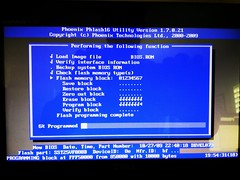
Copied them over to the FreeDOS USB stick, booted the target system off that, then under FreeDOS Live CD, was able to update BIOS with:
PHLASH16.EXE BIOS.ROM
Reference: https://wiki.ubuntu.com/DellBIOS
Leave a comment